Getting a phone number and SIM in South Korea
Get online the day you land, then move to a monthly plan when your residence card arrives. Here's what each step asks for, what the big carriers and budget brands charge, and how to hold on to your number from home.
AbroadPin team7 min read
Contents
In Korea your phone number does a lot of quiet work. Apps use it to confirm who you are, couriers text you about parcels, and your school and landlord will want it on day one. The snag for new teachers is timing. A monthly contract in your own name usually waits for your residence card, and that card takes a few weeks to come through after you apply [2]. So most teachers sort their phone in two stages: a prepaid line to get through the first weeks, then a proper plan. For pay, visas and the kinds of employer, see the main guide to teaching in South Korea.
Stage one: a prepaid line for your first weeks
You can get a prepaid line with nothing more than your passport [1]. These are the usual ways teachers do it:
- A travel eSIM set up before you fly. Seoul Start says these can be installed before landing and are often cheaper than the airport counters [1]. Many are internet only, so check whether the one you pick gives you a Korean number for calls and texts.
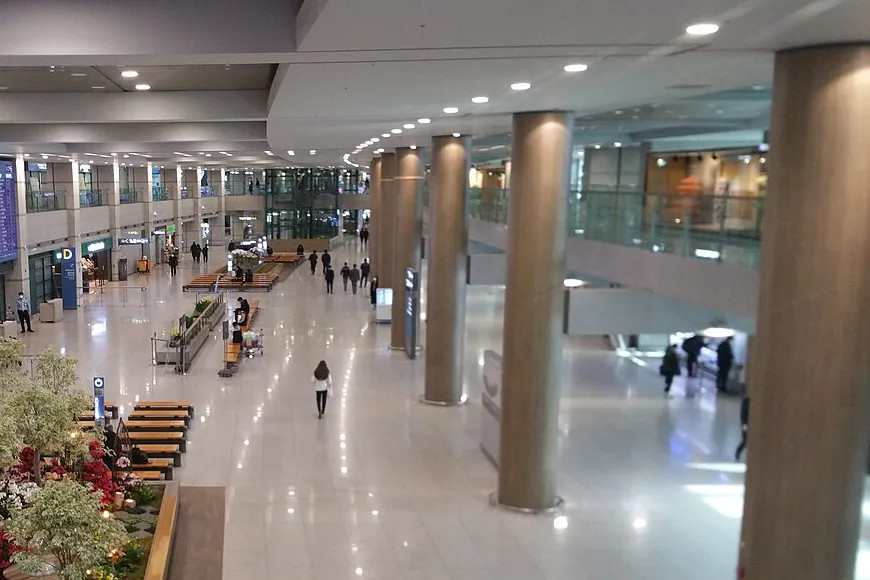
- A prepaid SIM at Incheon Airport. Counters in the arrivals halls of Terminals 1 and 2 sell them on a passport alone, for roughly 30,000 to 60,000 KRW depending on how long the plan lasts and how much it includes, and they work straight away [1].
- A prepaid SIM from a convenience store. Seoul Start puts these at 10,000 to 30,000 KRW a month, again with only a passport [1].
- A prepaid line from a provider aimed at foreigners. CHINGUMOBILE is one example: it says its prepaid plans open with a passport only, offers both a physical SIM and an eSIM, and lets you collect at the airport, at a store or by courier [4]. Its plans with unlimited calls and texts run from 7 to 120 days, and one with 10.3GB costs 23,000 to 90,000 KRW depending on the length you choose [4]. Its data-only eSIM can receive calls and texts but not make them [4].
If you can, pick a prepaid option that comes with a Korean number rather than an internet-only one. Immigration sends a text message when your residence card is ready to collect, and you'll want to be reachable for it [2].
Stage two: the residence card, then a monthly plan
At this stage the order of the steps matters more than which carrier you choose.
- Book your residence card appointment. Anyone staying in Korea for 91 days or more has to register within 90 days of arriving [2]. Make the booking on HiKorea or its app, because most offices no longer take walk-ins [2].
- Bring the papers and the fee. For an E-series work visa, Seoul Start lists your passport, one passport-style photo, proof of your Korean address and an employer letter or your contract, with a photocopy of each [2]. The fee is 35,000 KRW, raised from 30,000 KRW on 1 January 2025 [2].
- Wait for the text. Processing typically takes a few weeks, and you collect the card at the same office with your passport and receipt [2].
- Sign up for a monthly plan. Seoul Start says a contract asks for the residence card, your passport, a way to pay by autopay (a Korean bank account or a Korean-issued card) and your phone's IMEI number [1].
The autopay step ties your phone to your bank, so many teachers do the two in the same week or two. The guide to opening a bank account in South Korea covers the bank side.
When you sign up, ask for the line to be registered under your residence card number (외국인등록번호), not your passport number. Seoul Start says many carriers file a new foreign customer under the passport number by default, which is behind most failed sign-ups on Karrot, the second-hand marketplace app, and the carrier can change it on request [3].
One more rule matters at renewal time. Seoul Start quotes the rule that a resident with 60 days or less left on their legal stay can't join a regular monthly plan and can only use prepaid [1]. If your visa extension is still in progress near the end of your stay, keep that in mind before you switch plans.
The carriers and the budget brands
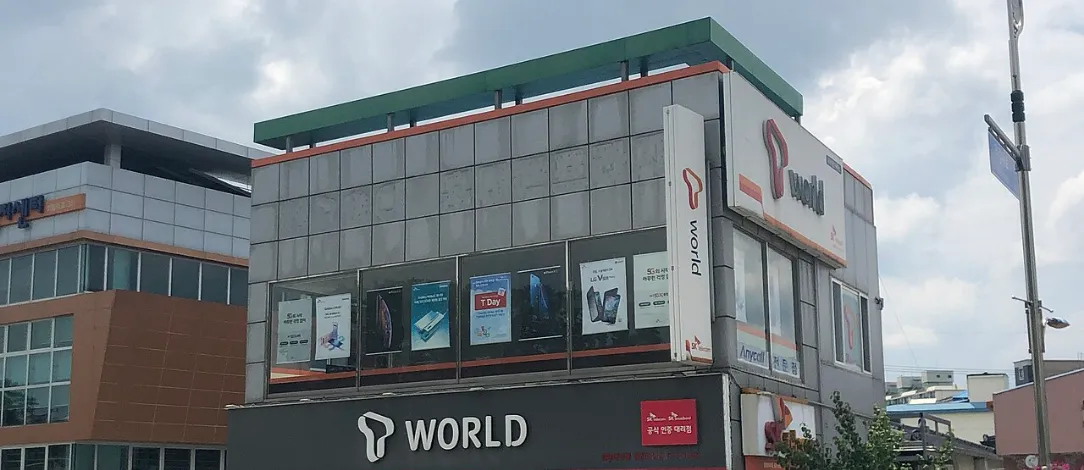
Korea has three networks: SK Telecom (SKT), KT and LG U+ [1]. Seoul Start describes them like this:
- SKT has the strongest nationwide coverage and fastest 5G, but limited help in English [1].
- KT has good coverage and some branches that are used to foreign customers [1].
- LG U+ competes on price, with limited help in English [1].
All three offer eSIM on compatible iPhone and Android models [1].
Budget brands, called 알뜰폰 in Korean, rent space on those same three networks and sell it for less. Seoul Start says they cost 50 to 70% less than the big carriers with the same coverage [1]. Its June 2026 guide gives these monthly prices [1]:
| Plan | Monthly price | Network |
|---|---|---|
| Full plans at SKT, KT or LG U+ | 45,000 to 80,000 KRW | Own network |
| Budget brands in general | 11,000 to 30,000 KRW | SKT, KT or LG U+ |
| Budget plans with 10GB or more | 15,000 to 25,000 KRW | SKT, KT or LG U+ |
| LG Hello Mobile | From about 11,000 KRW | LG U+ |
| Mobing | From about 11,000 KRW | SKT |
| KT M Mobile | From about 13,000 KRW | KT |
| EG SIM | From about 15,000 KRW | KT |
Two of those brands stand out for newcomers. LG Hello Mobile lets residence card holders activate online without a shop visit, and EG SIM has an English app and English support [1].
To compare budget plans yourself, the 알뜰폰 Hub is a comparison site run by the Korea Association for AI and ICT Promotion (KAIT) [5]. Many of the prices on it are introductory. On 5 November 2026, one plan on the SKT network with 5GB showed 10 KRW a month for 12 months, then 4,800 KRW [5]. A plan on the KT network with 100GB showed 7,800 KRW a month for 6 months, then 44,000 KRW [5]. Look at the price after the offer ends, and check that a provider signs up foreign residents before you apply, because the comparison site doesn't say.
Why the number has to be yours
A Korean line is registered to a person's legal name, under the Telecommunications Business Act [1]. Seoul Start says using a line registered to an employer, a landlord or a friend breaks those real-name rules, and suggests getting your own line once your residence card arrives [1]. If your school lends you a phone in your first weeks, treat it as a stopgap.
The name on the line matters for daily life too:
- Identity checks in apps. Apps such as Karrot confirm who you are (본인인증) through your Korean carrier, using a number registered under your real name [3]. Karrot won't accept a number registered to someone else [3].
- Second numbers. Seoul Start says a dual-number service that adds a second number to a Korean line can't pass Karrot's identity check, because carriers don't confirm identity for secondary numbers [3].
- Your bank. Opening an account and using the banking app go more smoothly with a Korean number, as the bank guide linked above explains.
- Parcels, clinics and school. Delivery drivers text or call when they can't find your door, and clinics and your school use the same number to reach you.
eSIM or a physical SIM
An eSIM saves a trip and lets you keep your home SIM in the same phone. Before you count on it, check two things:
- Your phone is unlocked. A phone locked to a carrier back home won't take a Korean SIM or eSIM.
- It supports eSIM. Most recent models do. Seoul Start says all three Korean carriers offer eSIM on compatible phones [1].
If either answer is no, a physical SIM is the simpler choice.
Switching carrier and keeping your numbers
Inside Korea, moving your number to a new carrier is called 번호이동. The new carrier handles it, your old plan is cancelled automatically, and it usually takes 1 to 3 days [1]. The number on a short-term tourist SIM usually can't be carried over [1]. Expect a new number when you move to a monthly plan, and update your school, bank and apps at that point.
Your number from home needs a plan of its own, since banks, tax offices and loan servicers there often send sign-in codes by text:
- Ask your home carrier before you leave whether it has a cheap plan for parking a number, what it costs each month and what you'd pay if a text reaches you abroad.
- Use both SIMs in one phone. A dual-SIM phone can hold your Korean line and your home line together. Turn off mobile data on the home line so it doesn't roam.
- Switch sign-in codes to an authenticator app where your accounts allow it, so a lost home number doesn't lock you out.
Your phone checklist
- Before you fly, check your phone is unlocked and supports eSIM, and decide what to do with your home number.
- On arrival, get a prepaid SIM or eSIM, ideally one with a Korean number [1].
- In your first week, book your residence card appointment, since you have 90 days to register [2].
- Open a bank account so you have a way to pay by autopay.
- When the card arrives, sign up for a monthly plan registered under your residence card number [1] [3].
- Give the new number to your school, your bank and your landlord.
Still choosing where to teach? See the open jobs in South Korea.
See jobs in South Korea
- Kindergarten and Elementary English Teacher, March 2027 (English academy Munjeong Songpa Seoul)Seoul
- Kindergarten English Teacher, March 2027 (immersion kindergarten Sinsa Gangnam Seoul)Seoul
- Kindergarten English Teacher, three posts, March 2027 (English kindergarten Gangnam Seoul)Seoul
- Pre-K Homeroom English Teacher, March 2027 (Hillside Collegiate Songdo Incheon)Incheon
- Primary and Secondary English Teacher, March 2027 (private school Gangnam Seoul, 3.0M to 3.5M won)Seoul
By city: Teaching jobs in Seoul · Teaching jobs in Incheon · Teaching jobs in Seongnam · Teaching jobs in Suwon
Sources and photo credits
- 1.Seoul Start, Korea SIM card guide (updated 21 June 2026, read 5 November 2026)
- 2.Seoul Start, ARC registration guide (updated 27 October 2026, read 5 November 2026)
- 3.Seoul Start, Karrot signup and identity checks for foreign residents (updated 7 August 2026, read 5 November 2026)
- 4.CHINGUMOBILE, prepaid plans for foreigners (read 5 November 2026)
- 5.Korea Association for AI and ICT Promotion (KAIT), 알뜰폰 Hub budget plan comparison (read 5 November 2026)
Photos
- The arrivals hall at Incheon International Airport, Terminal 1.: Bonnielou2013, CC BY-SA 4.0, via Wikimedia Commons
- An SK Telecom T world shop in South Korea.: Choi Kwang-mo, CC0, via Wikimedia Commons
Get new jobs in South Korea by email
One email a week with the jobs added since the last one. Free, with no account.
Nothing is sent until you open the link we email you. Choose a role, a pay level or daily emails
We use your address only to send the alerts you ask for, and every email has a one-click unsubscribe link. The privacy notice says how long we keep it, and the terms of use cover the alerts.
We check this guide again by February 3, 2027. Rules change, so confirm visa steps with the embassy and your school before you go. First published November 5, 2026. Spotted something out of date? Tell us. How we write these guides.